How to do M-Pesa Integration for Your Business in Kenya
Emanuel
· 18 min read
Discover how Kenyan businesses can integrate M-Pesa into websites, mobile apps and business systems using Safaricom's Daraja API.
For many businesses in Kenya, accepting M-Pesa payments is no longer just about displaying a Paybill or Till number at the checkout.
Customers increasingly expect to complete payments directly through websites, mobile applications, and digital platforms without having to leave the service they are using.
A customer booking a hotel room, purchasing products online, paying school fees or subscribing to a digital service should be able to initiate a payment and receive confirmation without an employee manually checking the transaction.
This is where M-Pesa integration comes in.
M-Pesa integration allows a business to connect its website, mobile application or internal management system to Safaricom's payment infrastructure so that payments can be initiated, received, confirmed and recorded automatically.
In Kenya, this is commonly implemented using Safaricom's Daraja API, which provides developers with the tools to connect M-Pesa services to digital applications.
For businesses looking to automate payments, reduce manual reconciliation and improve the customer checkout experience, understanding how this integration works is an important starting point.
What Is M-Pesa Integration?
M-Pesa integration is the process of connecting a business application to M-Pesa so that financial transactions can be initiated or received electronically.
Instead of requiring customers to manually enter a Paybill number, account number and payment amount, an integrated system can initiate a payment request and receive transaction feedback automatically.
For example, consider an online shop selling products through its website.
Without integration, the customer might:
Place an order.
Receive a Paybill number and account reference.
Open the M-Pesa menu on their phone.
Enter the business details and amount.
Complete the payment.
Wait for the business to verify the transaction manually.
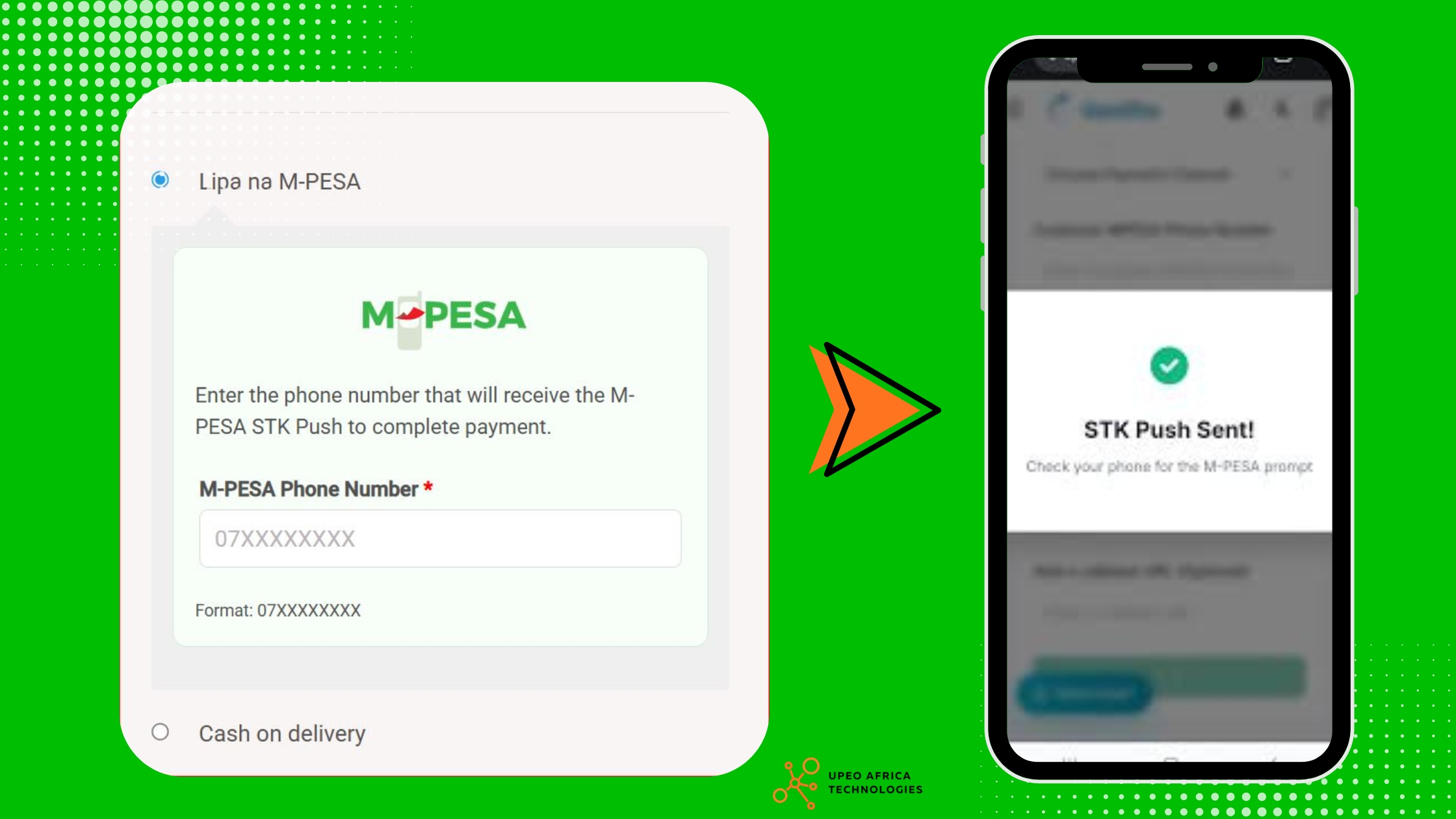
With STK Push integration, the process can be simpler.
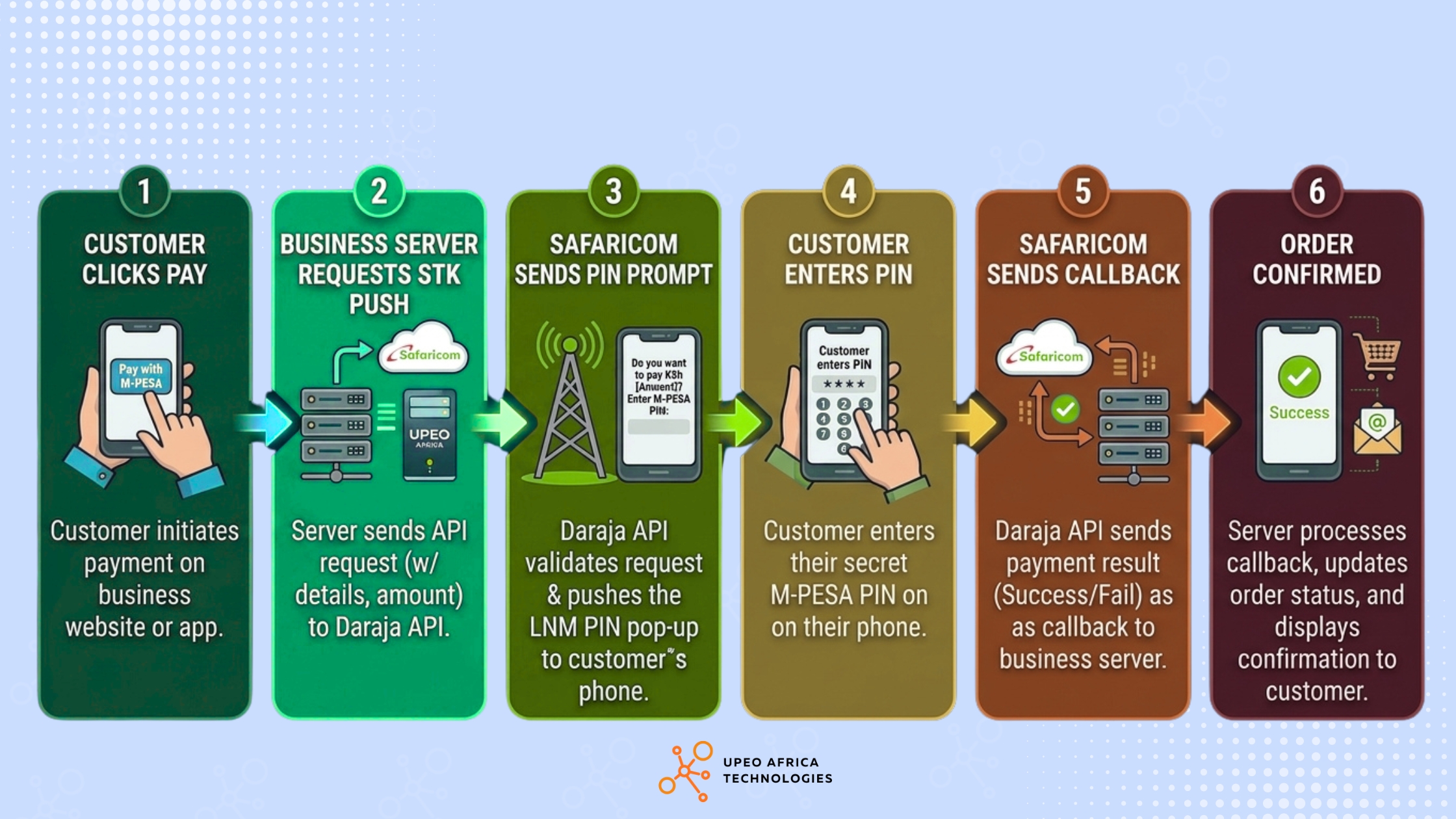
The customer selects a product and proceeds to checkout.
They enter their M-Pesa phone number.
The website sends a payment request through Daraja.
An M-Pesa payment prompt appears on the customer's phone.
The customer enters their PIN and authorises the payment.
Safaricom processes the transaction and sends the result to the business application.
The website updates the order based on the verified transaction result.
The customer does not have to manually enter the Paybill details.
The important distinction is that the application must receive and process the transaction result correctly. Sending a payment request or receiving an initial API acknowledgement does not, by itself, mean that the customer has paid.
What Is Safaricom Daraja API?
Daraja API is Safaricom's developer platform for connecting M-Pesa and other Safaricom services to websites, mobile applications, and business systems.
Daraja is the technology interface that allows developers to build applications that communicate with Safaricom's APIs.
Rather than developing a payment network from scratch, a business can use the available API products to connect its application to supported M-Pesa transaction services.
The developer portal provides access to documentation, application credentials, sandbox testing and API integration resources.
For businesses, this means an existing website or application can potentially be extended to support automated M-Pesa payments without having to replace the entire platform.
What can businesses do with Daraja?
Depending on the API product and permissions approved for the business, Daraja supports several payment-related operations:
Initiate customer payments through STK Push.
Receive customer payments through C2B integrations.
Send payments to customers through B2C.
Query the status of supported transactions.
Connect payment activities to other business applications.
The appropriate API depends on whether the business is collecting money, disbursing money or managing transaction records.
What Are the Different Types of M-Pesa Integration?
Not every business needs the same M-Pesa functionality. A website accepting customer payments has different requirements from an organisation distributing funds to beneficiaries.
The following are some of the most relevant integration options.
1. M-Pesa STK Push Integration
STK Push, also known as M-Pesa Express, allows a business application to initiate a payment request that appears directly on the customer's phone.
The customer receives a prompt and authorises the transaction using their M-Pesa PIN.
This is particularly useful for:
E-commerce websites.
Online booking platforms.
Hotel and travel reservations.
School fee payment portals.
Subscription-based applications.
Digital service marketplaces.
Customer account top-ups.
Example: An online booking platform.
A customer books a safari package through a tour operator's website.
Instead of asking the customer to leave the website and manually send money to a Paybill, the platform requests their phone number and initiates an STK Push.
Once the payment is completed and the application verifies the transaction result, the booking can be marked as paid.
The business can also store the M-Pesa receipt number against the booking for future reference.
This makes it easier to connect customer bookings, payment records and operational processes.
2. Customer-to-Business (C2B) Integration
C2B refers to transactions where customers send money to a business.
This can support businesses that want to receive M-Pesa payments and automatically process the corresponding transaction information.
For example, a business may already have a Paybill number through which customers make payments.
With an appropriate C2B integration, the business application can receive transaction information and use it to update customer records, invoices or account balances.
Common applications include:
School fee management systems.
Utility payment platforms.
Retail and wholesale businesses.
Membership management systems.
Customer account management platforms.
Internal payment tracking applications.
A particularly useful feature is the ability to connect incoming payments to an identifiable customer or account reference.
For example, a school could use student admission numbers as payment references, making it easier to associate incoming payments with the correct student account.
C2B integrations may also involve URL registration, validation and confirmation handling, depending on the selected configuration and Safaricom's requirements.
3. Business-to-Customer (B2C) Integration
B2C is used when a business needs to send money from its M-Pesa business account to customer mobile numbers.
Unlike STK Push, where the customer authorises a payment from their own account, B2C allows an authorised business system to initiate disbursements.
Safaricom describes B2C as a service for sending money to registered mobile money customers, with the transaction outcome returned through the configured callback.
Possible applications include:
Employee payments.
Customer refunds.
Supplier and beneficiary disbursements.
Approved incentive payments.
Insurance claim payouts.
Commission payments.
Example: A digital marketplace.
Imagine a platform connecting customers with service providers.
When a customer pays for a service, the platform records the transaction. Once the service has been completed and the payout conditions have been satisfied, the business can initiate a payment to the service provider through an appropriately configured B2C integration.
This requires careful handling of business account permissions, available balances, transaction limits and approval processes.
4. M-Pesa Transaction Status Integration
A payment can sometimes be initiated successfully without the application immediately receiving the final transaction result.
Network interruptions, callback delays, or other processing issues can leave the business unsure whether a transaction completed.
This is why transaction-status functionality is important.
Safaricom provides a Transaction Status API that allows an organisation to query the status of supported M-Pesa transactions using the appropriate transaction identifiers. It is particularly useful when the expected callback has not arrived.
For example, if a customer reports being charged but the website still displays an unpaid order, the system should not immediately ask them to pay again.
Instead, it should investigate the original transaction and reconcile the result before making another payment request.
This helps prevent duplicate charges and unnecessary customer disputes.
How Does M-Pesa STK Push Integration Work?
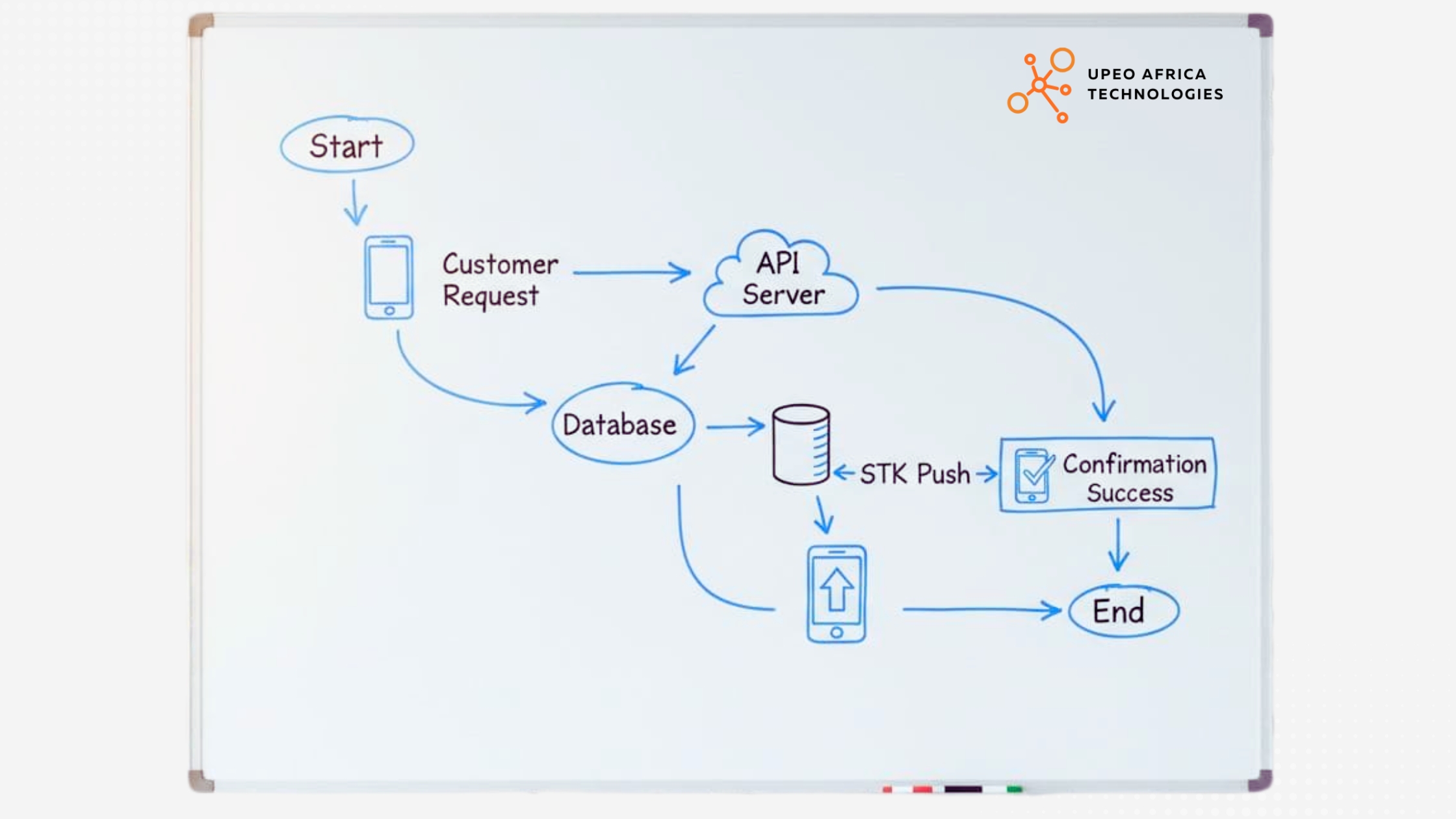
M-Pesa STK Push Integration Steps
For most businesses accepting payments through websites and mobile applications, STK Push is a useful place to start.
Although the customer experience appears straightforward, several technical operations happen behind the scenes.
The typical process involves the following stages.
Step 1: The customer initiates checkout
The customer selects a product or service and proceeds to the payment section.
The application records the order and generates a unique internal reference for the transaction.
This reference is important because it allows the business to connect the eventual payment result to the correct order.
Step 2: The application requests authorisation from Daraja
The backend application communicates with Safaricom's API using the appropriate credentials and authentication process.
It then submits the payment request with the required information, including the business shortcode, amount, customer phone number and callback URL.
Sensitive API credentials should remain on the server, not inside publicly accessible website or mobile application code.
Step 3: The customer receives the STK Push prompt
Safaricom processes the request and, where accepted for processing, initiates the payment prompt on the customer's phone.
The customer reviews the payment and enters their M-Pesa PIN to authorise it.
The customer may also cancel the transaction or fail to complete it.
Step 4: Safaricom sends the transaction result
After processing, Safaricom sends the result to the callback URL provided by the application.
The backend must process this response and determine whether the transaction succeeded or failed.
A successful API acknowledgement at the beginning of the process must not be confused with a completed payment.
Step 5: The business system updates the order
Once the transaction result has been properly processed and verified, the application updates the relevant record.
Depending on the business, this could mean:
Marking an order as paid.
Confirming a hotel or safari booking.
Activating a subscription.
Updating a school fee balance.
Issuing a receipt.
Recording a payment against a customer account.
The system should also retain relevant transaction references for reconciliation and support.
What Do You Need Before Integrating M-Pesa Into Your Business?
One of the common misconceptions about M-Pesa integration is that a developer only needs a Paybill number to begin.
The actual requirements depend on the integration type, business account configuration and Safaricom's approval process.
For a typical production STK Push integration, the following are important.
1. A registered business and suitable M-Pesa account
Your business needs an appropriate M-Pesa business payment arrangement, such as a Paybill or Till, depending on the intended integration and Safaricom's requirements.
If you do not already have one, establish the suitable account arrangement with Safaricom before planning the production integration.
2. A Daraja developer account
A developer account is required to access the Daraja platform.
Safaricom's portal allows developers to register as individuals or companies and create applications for API testing.
3. API credentials
Your application needs the appropriate credentials for the selected API and environment.
For a typical STK Push integration, these include:
Credential
Purpose
Consumer Key
Identifies the Daraja application
Consumer Secret
Used in the application authentication process
Business shortcode
Identifies the relevant M-Pesa business account
Passkey
Used to generate the STK Push request password
Production credentials and sandbox credentials are not interchangeable.
These credentials should be handled securely and never published in frontend code, public repositories or client-side application settings.
4. A website or application with a backend
The integration needs a backend that can securely communicate with Daraja, initiate transactions and process callbacks.
This can be an existing application or a new platform developed for your business.
The backend is responsible for managing transaction references, authentication, payment requests, callback processing and payment records.
5. A publicly accessible callback endpoint
The callback URL is where Safaricom sends the transaction result.
It needs to be reachable by Safaricom's systems so that the application can receive payment feedback.
A developer must configure the endpoint correctly, test its availability and ensure it can handle incoming responses reliably.
For a production implementation, use secure HTTPS endpoints and follow Safaricom's current callback requirements.
6. Production access and approval
Sandbox access is intended for development and testing. It does not automatically grant permission to process real payments.
Before going live, the business and developer must complete the applicable Safaricom production onboarding and approval requirements.
The exact permissions and account arrangements depend on the API product being enabled.
What Is the Difference Between M-Pesa Sandbox and Live Integration?
Safaricom provides a sandbox environment through Daraja so developers can test their applications before connecting to production services.
This is an important stage because a payment system should be tested against different transaction outcomes rather than only a successful payment.
Area
Sandbox environment
Production environment
Purpose
Development and testing
Actual business transactions
Credentials
Test credentials
Approved production credentials
Money
Simulated transactions
Real financial transactions
Customers
Test data and supported simulators
Actual M-Pesa customers
Payment confirmation
Simulated responses
Actual transaction responses
Deployment
Development or staging
Live business application
Approval
Sandbox access
Applicable production approval
A developer should test the complete payment process in the sandbox before requesting or completing production onboarding.
However, passing sandbox tests does not guarantee that the production integration will work without issues. Live testing and monitoring remain necessary.
How Much Does M-Pesa Integration Cost in Kenya?
The cost of integrating M-Pesa depends on the existing technology, the type of integration and how much functionality the business needs.
There is no universal development price that applies to every business.
A website requiring a straightforward STK Push checkout has different requirements from an enterprise application managing payments, refunds, customer accounts, transaction reconciliation and multiple branches.
The following factors influence the cost.
1. Existing website or application
If your business already has a properly structured website or application with a backend, integrating M-Pesa may be relatively straightforward.
If the existing platform requires significant modifications, the project may involve additional development.
2. Type of integration
An STK Push checkout, C2B payment collection system and B2C disbursement platform have different technical requirements.
A business requiring multiple payment flows will generally need a broader integration scope.
3. Payment reconciliation
Some businesses only need to record successful payments.
Others need to match transactions against invoices, bookings, customer accounts, subscriptions or inventory records.
More advanced reconciliation requirements increase the development and testing work.
4. Additional integrations
Your application may also need to communicate with accounting software, CRM systems, inventory platforms, SMS providers or other payment services.
Each additional integration introduces its own requirements and testing considerations.
5. Security and transaction monitoring
A production payment system needs appropriate security, logging, error handling, monitoring and backup arrangements.
These should be considered part of the project rather than treated as optional additions after launch.
A practical way to estimate your project
Before requesting a quotation, identify the payment operations you need.
For example:
Business requirement
Suggested scope
Accept customer payments on a website
STK Push
Receive Paybill transactions automatically
C2B
Pay customers or beneficiaries
B2C
Match payments to customer invoices
Transaction reconciliation
Check delayed payment results
Transaction Status API
Connect payments to accounting software
Third-party API integration
This gives a developer a clearer picture of the work involved and makes it easier to prepare a meaningful quotation.
For Safaricom transaction tariffs and charges, businesses should consult the applicable official business payment terms. Development fees and provider transaction charges are separate costs.
Common M-Pesa Integration Problems Businesses Should Avoid
A payment integration may work perfectly during a demonstration and still encounter problems once real customers start using it.
This is often because the development process focuses too heavily on initiating payments and not enough on what happens after the request is sent.
Here are some issues businesses should consider before going live.,
M-pesa Integration mistakes
1. Marking an order as paid before confirmation
An application should not automatically mark an order as paid simply because Daraja accepted the initial payment request.
It should wait for the final transaction result and update the order according to the verified outcome.
2. Processing duplicate callbacks
Payment callbacks may be delivered more than once or processed after a delay.
The system should recognise an already-processed transaction and prevent it from crediting an order or customer account twice.
This is commonly addressed through idempotent transaction processing and unique payment references.
3. Ignoring failed or cancelled payments
Customers may cancel the STK prompt, enter an incorrect PIN or fail to complete a transaction.
The system needs to handle these outcomes without creating a false successful payment record.
4. Failing to reconcile payments
A customer may report that money has been deducted while the business application still shows an unpaid transaction.
There should be a process for investigating the transaction using available references and the appropriate status-query mechanisms.
5. Exposing API credentials
Consumer keys, secrets and passkeys should never be placed in publicly accessible JavaScript files or mobile application code.
They should be stored securely on the backend with access restricted to authorised systems and personnel.
6. Failing to monitor the integration
A payment system should not be considered complete simply because it has been deployed.
Businesses need visibility into failed requests, callback processing problems, delayed transactions and reconciliation mismatches.
These issues should be detectable by the technical team before they become recurring customer complaints.
Can You Integrate M-Pesa Into an Existing Website or Mobile Application?
Yes. In many cases, there is no need to rebuild your entire website or mobile application to introduce M-Pesa payments.
An existing platform can be assessed to determine whether it has the backend architecture and integration points required to communicate with Daraja.
For example:
Existing platform
Possible integration
WordPress website
M-Pesa checkout for supported e-commerce or custom booking functionality
WooCommerce store
M-Pesa payments during checkout
Custom PHP application
Daraja API integration through the backend
Django application
Payment initiation, callbacks and transaction records
Laravel application
M-Pesa payment processing and reconciliation
React or Next.js application
Backend-connected STK Push checkout
Android or iOS application
Mobile payment initiation through a secure backend
The exact implementation depends on the existing architecture and the functionality required.
For instance, a Next.js website can provide the checkout interface, but sensitive payment credentials and transaction processing should be handled through secure server-side components.
A WordPress website may also use an existing payment extension where it meets the business requirements. Custom development is more appropriate when the standard extension cannot support the required workflow.
The important thing is to assess the existing platform before recommending a complete replacement.
Why Payment Integration Should Go Beyond Accepting Money
For a growing business, accepting payments is only one part of the process.
The bigger opportunity is connecting financial transactions to the rest of the organisation.
Consider a company operating an online store, an inventory system and an accounting application.
When a customer completes a payment, the business may need to:
Confirm the payment.
Update the order.
Adjust inventory.
Generate a receipt.
Notify the customer.
Update the accounting records.
Include the transaction in management reports.
When these processes are disconnected, employees end up doing work that the software should be handling.
With the right integrations, these activities can be coordinated through a single operational workflow.
This is especially useful for businesses operating several branches, handling frequent transactions or managing large customer databases.
A well-designed payment integration should therefore consider the entire transaction lifecycle, from payment initiation to financial reconciliation.
How Upeo Africa Technologies Helps Businesses Integrate M-Pesa
Upeo Africa Technologies provides API and payment integration services for businesses in Kenya and across Africa.
Based in Mombasa, the company works on connecting payment services and business applications so that financial transactions can be processed and recorded as part of wider business operations.
Its published API & Payment Integration service covers:
M-Pesa STK Push, C2B and B2C.
Airtel Money integration.
Bank and card payment integrations.
REST and GraphQL API development.
Accounting, CRM and inventory integrations.
Payment callbacks and transaction reconciliation.
Upeo Africa's approach goes beyond getting a payment prompt to appear on a customer's phone.
The integration process considers the operational details that matter after a customer initiates payment.
How the integration process works
01. Requirements and payment flows
The first stage establishes how customers should pay, which M-Pesa services are required, where transactions should be recorded, and what the finance team needs for reconciliation.
02. Sandbox development
The developers implement the integration and test it against the available sandbox environment.
This includes testing unsuccessful transactions, timeouts, callback handling and duplicate confirmations.
03. Reconciliation design
Payment records are linked to relevant business references so that transactions can be matched against orders, invoices or customer accounts.
04. Production deployment
The team works through the production configuration, callback URLs and applicable go-live requirements.
05. Monitoring and support
After deployment, the integration needs monitoring to identify failed callbacks, transaction problems and reconciliation mismatches.
If your business also needs a new website or operational platform, explore Custom Web Applications.
Frequently Asked Questions About M-Pesa Integration in Kenya
1. How can I integrate M-Pesa into my website in Kenya?
You can integrate M-Pesa into your website using Safaricom's Daraja API. The process involves setting up a Daraja application, obtaining the appropriate credentials, implementing the payment functionality on your backend, configuring callbacks, testing in the sandbox and completing the applicable production onboarding requirements.
2. Do I need a Paybill or Till number to integrate M-Pesa?
For common production business payment integrations such as STK Push, an appropriate business shortcode and payment arrangement are required. Whether you use a Paybill or Till depends on your business and the selected integration. Confirm the applicable requirements with Safaricom.
3. What is the difference between STK Push and C2B?
STK Push initiates a payment prompt on the customer's phone so they can authorise a transaction. C2B is an API arrangement for receiving customer-to-business payments and processing the associated transaction information.
4. Can I integrate M-Pesa with WordPress or WooCommerce?
Yes. M-Pesa can be connected to WordPress and WooCommerce through suitable payment extensions or custom integrations. The appropriate approach depends on your website, checkout requirements and the level of control you need over transaction processing.
5. How long does M-Pesa integration take?
The timeline depends on the existing application, integration type, testing requirements and production onboarding. A straightforward integration into an established platform will generally require less development work than a complete payment and reconciliation system.
6. Can M-Pesa payments be confirmed automatically?
Yes. Supported Daraja integrations use callbacks to send transaction results to the business application. The application can process successful transactions and update relevant records automatically, provided the callback and verification logic are implemented correctly.
7. Can M-Pesa be integrated with an accounting or inventory system?
Yes. M-Pesa transaction information can be connected to compatible accounting, inventory, CRM, and other business applications through APIs. This can reduce manual data entry and improve financial reconciliation.
8. Does Safaricom charge for M-Pesa API integration?
Development costs and Safaricom transaction charges are separate. The business should confirm the applicable M-Pesa tariffs, account charges and commercial terms directly with Safaricom. The software development quotation covers the technical work agreed with the developer.
Final Thoughts
M-Pesa integration is about more than giving customers another way to pay. It is about connecting payments to the systems that keep a business running.
Whether you operate an online store, a booking platform, a school, a subscription service or a larger organisation, the right integration can reduce manual payment verification, improve transaction records and create a more convenient customer experience.
The important part is implementing the integration correctly.
Payment requests, callbacks, failed transactions, duplicate confirmations and reconciliation all need to be considered before the system goes live.
If your business is still relying on manual M-Pesa payment verification or disconnected financial records, it may be time to connect your payment processes to your existing systems.
Upeo Africa Technologies helps businesses integrate M-Pesa and other payment services into websites, mobile applications and operational platforms.